


Colour Matching and Formulation — how a target colour becomes a recipe
A customer sends a sample and asks for “exactly this colour”. A designer chooses a shade from a colour card. A production batch drifts and has to be brought back. In each case the task is the same: find the mixture of pigments or dyes that reproduces a target colour on your material, in your process — and keep it the same from batch to batch.
This guide explains how colour matching and colour formulation work, what a colour matching system made of a spectrophotometer and formulation software can and cannot do, and what you need to start. It complements our Colour Measurement Guide, which explains colour numbers, ΔE and measuring geometries.
Contents
1 · From a colour you have seen to a colour you can make
Colour formulation always starts from a measurable target. The colour someone has seen has to exist as something that can be measured:
- A physical sample — a painted panel, a plastic part, a piece of fabric, a printed sheet. This is the best starting point, because it shows the colour on a real material.
- A colour standard or colour card — systems such as RAL or NCS. The card is measured like any other sample; for the most reliable result use a card that is clean and not faded.
- Stored measurement data — a reference measured earlier or received from the customer as a digital standard, measured with the same geometry.
A photograph or a colour on a screen is not a reliable target. Its appearance depends on the camera, the lighting when it was taken and the screen on which it is viewed; the same file looks different on two monitors. If a customer only has a picture, ask for a physical sample or for the colour number in a colour system.
2 · Visual matching and computer colour matching
Experienced colourists match colours by eye: they mix, compare with the target, add a little of one colorant and compare again. It works, but it depends on the person, the light and the number of trials. Computer colour matching uses measurement and calculation to shorten this path.
| Visual matching | Computer colour matching | |
|---|---|---|
| Starting recipe | From experience or an old recipe | Calculated from the measured target and the colorant database |
| Number of trials | Often several | Usually fewer — the first trial is closer to the target |
| Decision | Visual judgement | Colour difference ΔE against an agreed tolerance, plus a visual check |
| Other light sources | Checked in a light booth, if at all | Calculated for several illuminants; confirmed in a light booth |
| Cost of colorants | Not easy to compare | Recipes can be ranked by cost |
| Knowledge | Stays with the colourist | Recipes and corrections are stored and can be reused |
3 · How computer colour matching works
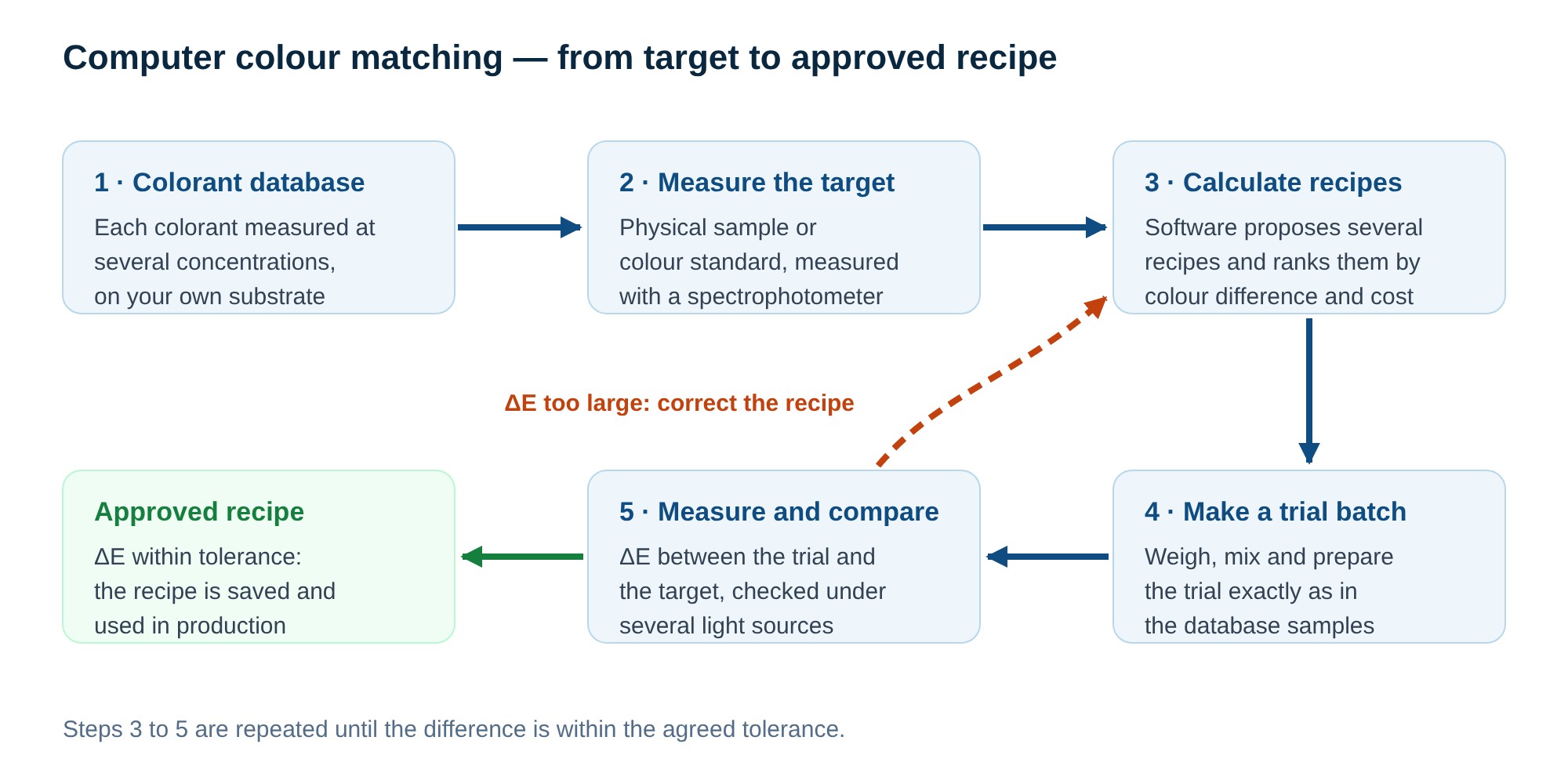
- Colorant database. Each colorant you use is prepared in several concentrations on your substrate and measured. The software learns how much each colorant absorbs and scatters light at every wavelength.
- Measure the target. The spectrophotometer records the reflectance curve of the target — how much light it reflects at each wavelength across the visible range.
- Calculate recipes. From the target curve and the database, the software calculates mixtures that reproduce the colour. Most systems are based on the Kubelka-Munk theory, which links reflectance to absorption and scattering of the colorants. The result is a list of recipes, ranked by colour difference, by match under other light sources and by cost.
- Make a trial batch. The chosen recipe is weighed and prepared exactly as the database samples were — the same substrate, film thickness or wall thickness, curing or processing conditions.
- Measure and correct. The trial is measured and compared with the target. If ΔE is outside the tolerance, the software calculates a correction from the measured difference, and the loop repeats until the result is accepted.
4 · The colorant database — the key to accuracy
The database is where most of the work — and most of the accuracy — lies. Software can only calculate with the colorants it knows, in the way they behave on your material.
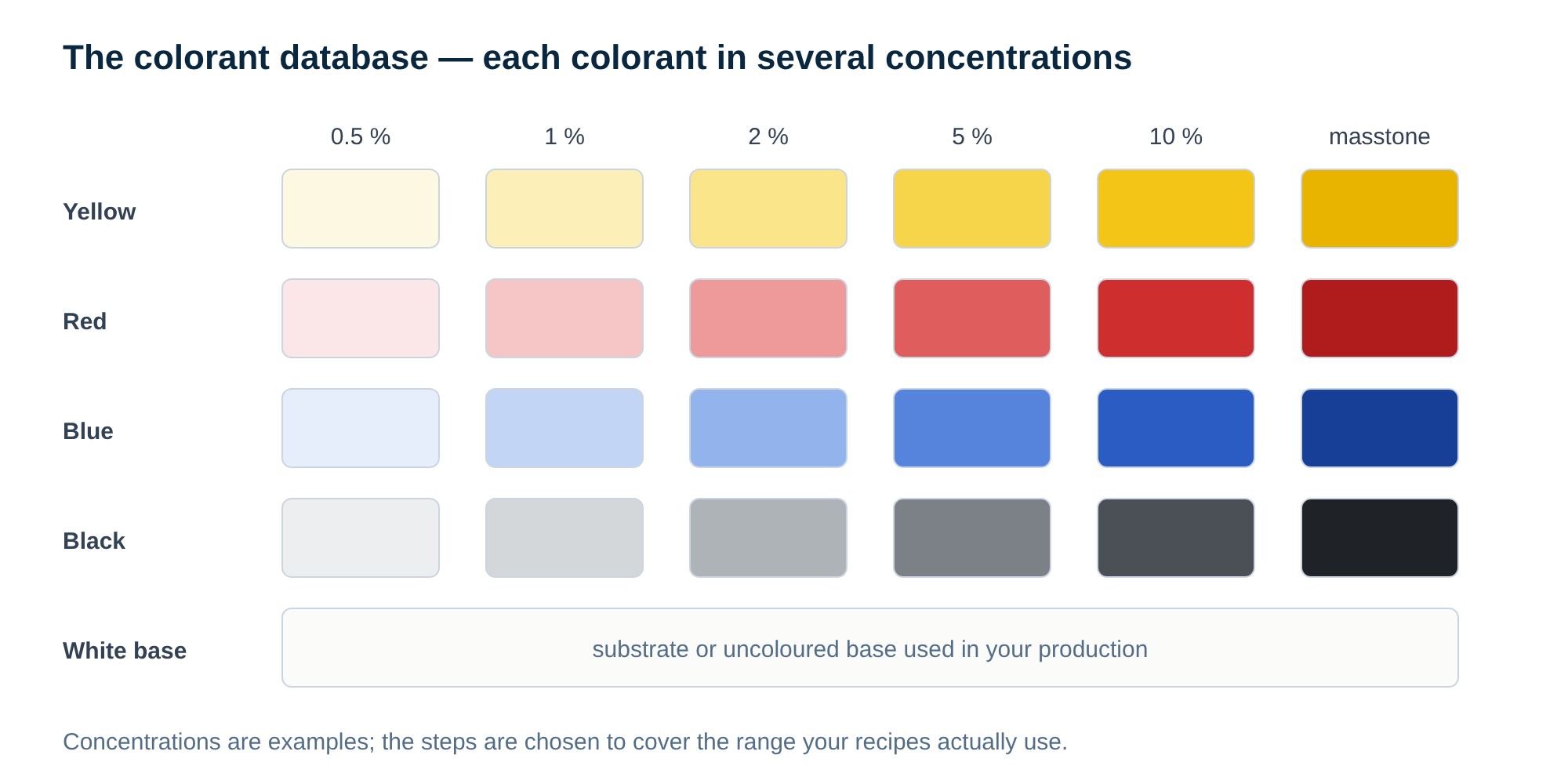
- Your colorants, your substrate. The database is built from the pigments or dyes you actually use, on your base material and in your process. A database made for one paint base or one polymer does not transfer to another.
- Careful preparation. Weighing accuracy, dispersion, film or wall thickness and curing must be the same for every sample. Errors in the database appear later in every recipe.
- Keep it current. When a supplier changes a colorant or the base material changes, the affected part of the database is measured again.
- Start small. Many companies start with the colorants used most often and add others as needed.
5 · Spectral match and metamerism
Two samples can look identical under daylight and different under store lighting. This effect is called metamerism, and it happens when the recipe uses different colorants from the target, so that the reflectance curves cross instead of following each other.
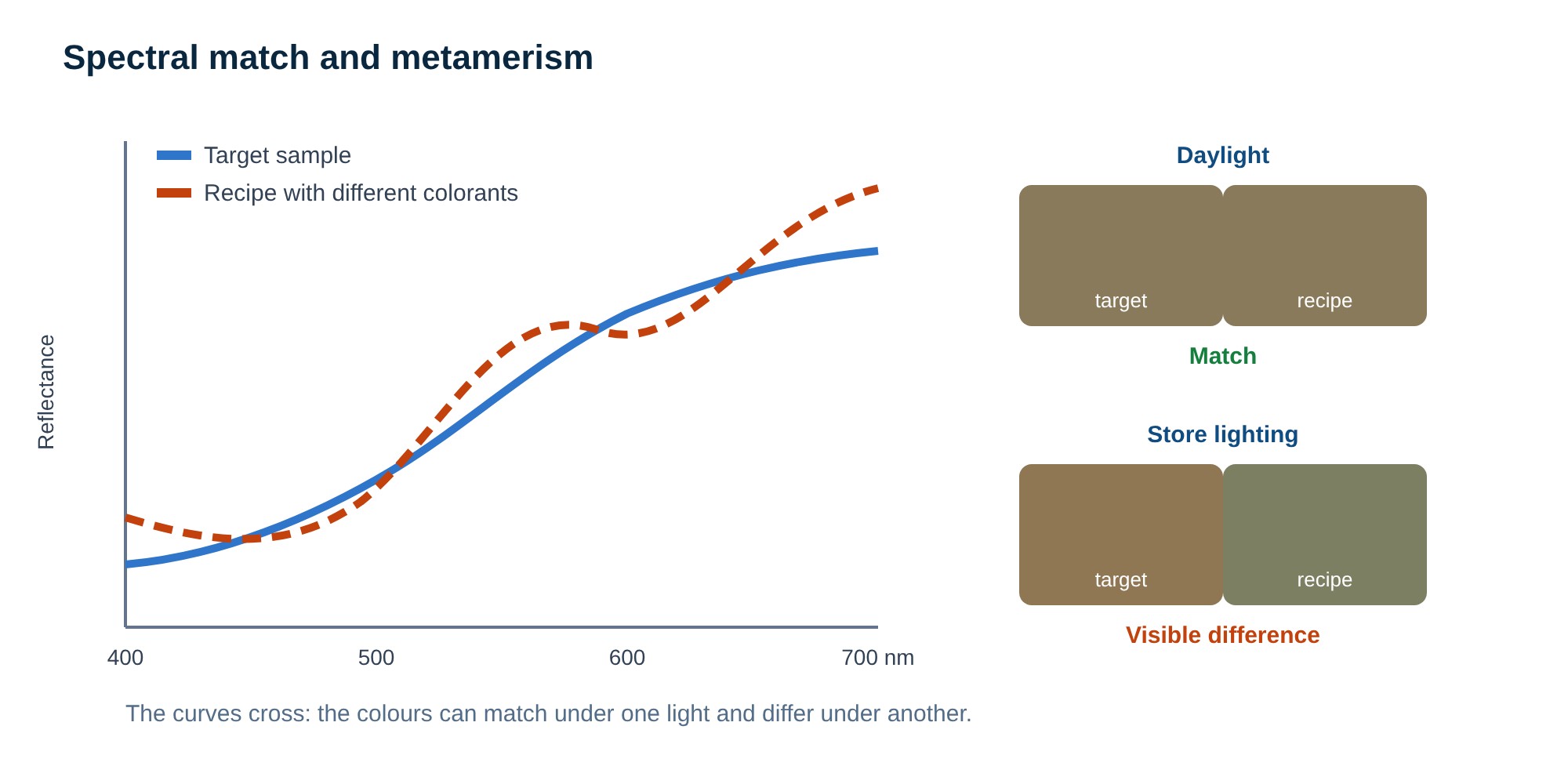
- Match the curve, not only the numbers. A recipe that follows the reflectance curve of the target keeps the match under all light sources. Formulation software can give priority to such recipes.
- Check several illuminants. Compare ΔE for daylight and for the light sources in which your product will be seen, for example store or home lighting.
- Confirm visually. A light booth with several standard light sources shows metamerism at once and is the usual final check before a recipe is approved.
6 · Where it is used
| Industry | Typical task | Points to watch |
|---|---|---|
| Paints and coatings | Matching customer colours and colour cards; correcting production batches | Film thickness, hiding power, gloss; tinting bases |
| Plastics and masterbatch | Matching a part or a reference plaque; masterbatch recipes | Wall thickness, processing temperature, translucency |
| Printing inks | Spot colours on a given paper or film | Ink film thickness, substrate colour and gloss |
| Textiles | Dye recipes for a fibre and dyeing process | Fibre type, liquor ratio, fastness; often several light sources |
| Building materials, paper, cosmetics | Shade control of coloured products | Texture, gloss and sample presentation |
Effect finishes — metallic and pearlescent coatings — change colour with the viewing angle. They are measured with multi-angle spectrophotometers and need formulation tools designed for effect pigments.
7 · What you need
- A benchtop spectrophotometer with d/8 sphere geometry — the standard instrument for formulation. Reflectance with SCI, a large aperture for averaging, and UV control for samples with optical brighteners or fluorescent colorants. Transmission mode adds liquids and transparent materials.
- Formulation software — calculation of recipes and corrections, the colorant database and recipe storage. Software is chosen by industry: paint, plastics, ink and textile formulation differ.
- A light booth — visual confirmation under several standard light sources.
- Sample preparation — a precise balance, a dispersing or mixing method and a repeatable way to make test panels, plaques or dyeings.
- Portable instruments in production — for checking batches against the approved standard; they should agree with the laboratory instrument.
8 · Limits and practical tips
- The software does not replace the colourist. It gives a good starting recipe and fast corrections; experience is still needed to judge the result and the process.
- The result depends on the process. If the trial is not made the same way as the database samples, the calculated recipe will not match.
- Agree the tolerance before you start. State the ΔE formula, the tolerance and the light sources with the customer, together with the visual check.
- Measure the target correctly. Several readings on different spots, a clean and flat surface, the same geometry and aperture as for the database.
- Translucent and textured materials need consistent sample thickness and presentation; otherwise the measurement, not the recipe, causes the difference.
9 · Frequently asked questions
Can you make a colour from a photo?
Not reliably. A photo shows the colour as the camera and the screen reproduce it, not as it is. Ask for a physical sample or a colour number from a colour system, and measure that.
Do I need formulation software, or is a spectrophotometer enough?
A spectrophotometer measures the target and checks the result. To calculate recipes and corrections you also need formulation software with a database of your colorants. For quality control of an existing recipe, the spectrophotometer and QC software are enough.
How long does it take to build a colorant database?
It depends on the number of colorants and on how quickly you can prepare and measure samples. Many companies start with the colorants they use most often and extend the database step by step.
Which ΔE tolerance should I use?
The tolerance is agreed with the customer and depends on the product and the colour. State the ΔE formula, for example ΔE*ab or ΔE2000, the tolerance and the light sources in the specification.
Can the same database be used for different materials?
No. A database belongs to a combination of colorants, base material and process. A new base or a new process needs its own database or at least a check of the existing one.
Read more
- Colour Measurement Guide — light, colour numbers, ΔE, geometries and instruments.
- Gloss Measurement Guide — gloss units, angles and gloss meters.
- Haze Measurement Guide — haze and transmittance of transparent materials.
- Colour measurement instruments — all groups: benchtop, portable, multi-angle, colorimeters, haze and gloss meters, light booths.
- Spectroscopy & Color catalogue — the full range.
Planning to formulate colours in-house?
Tell us your industry, the materials and colorants you use and how you match colours today. We will propose the instrument, the software approach and the way to build your colorant database.
sales@colo.siSales and support for international customers
COLO Lab ExpertsPolje ob Sotli 4, SI-3255 Buče, Slovenia Phone: +386 70 713 437 · Email: sales@colo.si · Web: colo.si We supply laboratories across Europe directly and through partners. B2B prices are quoted net, excluding VAT.