 COLO.Science · Technical Specification
COLO-WAM4
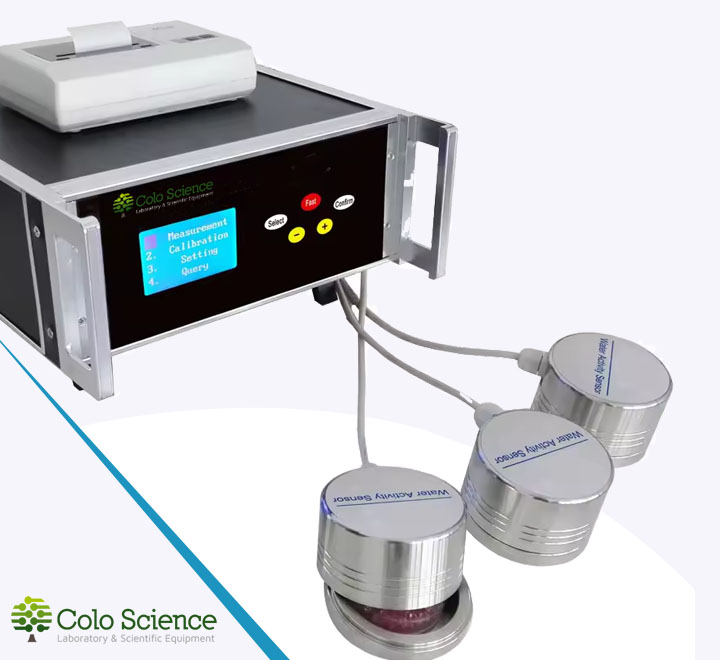
Multi‑channel Water Activity Meter · 1–4 Sensors · Large LCD
Professional water activity (aw) and temperature meter for laboratories and production.
Supports up to four independent sensors (expandable channel configuration).
Large 128×64 dot‑matrix LCD, automatic measurement cycle (5‑40 min) with high accuracy
±0.012 aw and excellent repeatability ≤0.008 aw. Multi‑point or single‑point
calibration. Stores up to 5000 data sets circularly; RS232 and USB interfaces
for PC connection. Dedicated Windows® software for data logging, curve display,
product‑based data management. Optional micro printer for end‑of‑measurement or real‑time
printout. Universal mains supply 100‑230 VAC.
aw 0‑1.000
Temp -10‑50°C
±0.012 aw
≤0.008 aw repeat
1‑4 sensors
5000 records
RS232 / USB
micro printer opt.
100‑230 VAC
Document type: Technical Specification Sheet
Format: Landscape (Word/Outlook‑ready)
Format: Landscape (Word/Outlook‑ready)
Instrument
COLO-WAM4 · COLO.Science
Address (HQ)
Polje ob Sotli 4
SI-3255, Slovenia
SI-3255, Slovenia
Contact
COLO-WAM4 · Technical Specification
Document ID: COL-TEC-WAM4-EN
Version: Landscape
Informational technical sheet · Non-binding · Controlled electronic document
Version: Landscape
Informational technical sheet · Non-binding · Controlled electronic document
COLO-WAM4 · Multi‑channel Water Activity Meter technical specification sheet
aw 0‑1.000
Temp -10‑50°C
±0.012 aw
≤0.008 aw repeat.
1‑4 sensors
5000 logs
RS232 / USB
micro printer opt.
— multi‑point calibration / PC software / auto‑measure 5‑40 min
General & performance specifications
| instrument identity | |
|---|---|
| instrument | COLO-WAM4 |
| model | WAM4 |
| parameters | Water activity (aw) / Temperature |
| display | Large‑screen LCD, 128×64 dots, graphic |
| measurement points / channels | 1 to 4 (expandable sensor inputs) |
| measurement range & resolution | |
| water activity (aw) | 0.000 … 1.000 aw |
| temperature | -10.0 … 50.0 °C |
| resolution aw | 0.001 aw |
| resolution temperature | 0.1 °C |
| accuracy & repeatability | |
| accuracy aw | ±0.012 aw (at 23±5 °C) |
| accuracy temperature | ±0.5 °C |
| repeatability (aw) | ≤0.008 aw |
| measurement time | 5 … 40 min (automatic, sample dependent) |
| environmental conditions | |
| operating temperature | -10 … 50 °C |
| relative humidity | 0 … 95 %RH (non‑condensing) |
| data processing & storage | |
| data memory | circular record of up to 5000 data sets |
| PC software | Windows® compatible; display of measured data & curves, save data, auto‑save by product name |
| calibration modes | multi‑point joint calibration, single‑point calibration |
| interfaces & communication | |
| computer connection | RS232 or USB (interface selectable) |
| print function | a) print at end of measurement b) real‑time print (requires optional micro printer) |
| electrical & physical | |
| supply voltage | 100 … 230 VAC ±10%, 50/60 Hz |
| power consumption | ≤10 W |
| standard configuration | data cable, power cord, instruction manual |
| optional accessories | micro printer, additional water activity sensors |
Key instrument features
| multi‑sensor capability | Supports up to 4 independent water activity / temperature probes (expandable). |
| large graphic LCD | 128×64 dots, clear reading of aw, temperature, channel and status. |
| high precision | ±0.012 aw accuracy, ≤0.008 aw repeatability – reliable results. |
| flexible calibration | Multi‑point joint or single‑point calibration to suit different samples and standards. |
| automatic measurement | Adjustable 5‑40 min measurement cycle; ideal for routine laboratory work. |
| large data memory | Stores up to 5000 data sets circularly; no loss of older records. |
| PC connectivity | RS232 and USB, with dedicated Windows software for data transfer, curve analysis and product‑based archiving. |
| printing options | End‑of‑measurement or real‑time printing via optional micro printer. |
| universal power supply | 100‑230 VAC, 50/60 Hz – ready for worldwide use. |
Typical applications
| food & beverage (bakery, dairy, meat, snacks, powders) |
| pharmaceuticals and cosmetics (moisture stability) |
| agricultural products (grains, seeds, hay) |
| textiles, paper, building materials |
| quality control / R&D laboratories |
Included / typical delivery (reference)
- COLO-WAM4 main instrument
- Data cable (USB or RS232 – according to order)
- Mains power cord (EU / UK / US type as region)
- Instruction manual (EN)
- Calibration report (factory)
- Optional: micro printer, additional sensors, calibration salts kit
Operation notes
| measurement start | Place sample in sealed measuring cell, select channel, start automatic measurement (time depends on sample). |
| calibration | Use saturated salt solutions for multi‑point calibration; single‑point quick check also possible. |
| data export | Connect via USB or RS232 to PC; use included software for curve display and product‑based filing. |
| printing | If micro printer is connected, select “print at end” or “real‑time” in setup menu. |
Ordering information (examples)
| WAM4‑1 | base unit with 1 sensor input |
| WAM4‑4 | base unit with 4 sensor inputs |
| ACC‑PRN | micro printer kit |
| ACC‑SENS | additional water activity sensor |
Practical operation notes
| topic | recommendation | note |
|---|---|---|
| sample preparation | Ensure sample is representative, fill measuring cup evenly, avoid temperature gradients. | Equilibrate to room temperature before measurement for best accuracy. |
| calibration frequency | Perform multi‑point calibration weekly or after changing sensor; single‑point before each series. | Use fresh saturated salt solutions (e.g. LiCl, MgCl₂, NaCl, K₂SO₄). |
| measurement time | Set auto‑measure time according to sample type: 5 min for fast equilibrating, up to 40 min for difficult samples. | Instrument signals when equilibrium is reached. |
| data handling | Use PC software to organise results by product name, date, batch; generate reports. | 5000 records circular – export periodically to avoid overwriting. |
| printer setup | Connect optional micro printer, select baud rate (if RS232) and print mode in settings. | Real‑time print shows each stable value; end‑of‑measurement prints final aw/T. |
Contact & Support
Headquarters address
Polje ob Sotli 4
SI-3255, Slovenia
Application guidance: tell us your sample types (food, pharma, etc.), required number of channels,
and if you need a micro printer or extra sensors. We will propose the optimal configuration.
Quick contact
Web:
colo.si
PDF Tech Spec:
COLO-WAM4.pdf
Email:
sales@colo.si
Phone:
+386 64 222 724
Knowledge hub:
COLO.Science
Manufacturer & configuration notice (important):
Specifications in this document are provided for general reference and may represent a typical configuration. COLO.Science reserves the right to change technical specifications without notice.
For procurement and tender purposes, the only valid and binding specification is the official COLO.Science quotation and the accompanying technical specification that is engineering-approved.
Specifications in this document are provided for general reference and may represent a typical configuration. COLO.Science reserves the right to change technical specifications without notice.
For procurement and tender purposes, the only valid and binding specification is the official COLO.Science quotation and the accompanying technical specification that is engineering-approved.